
Concepts
Architecture
swag2mcp acts as a bridge between API specifications and LLM agents:
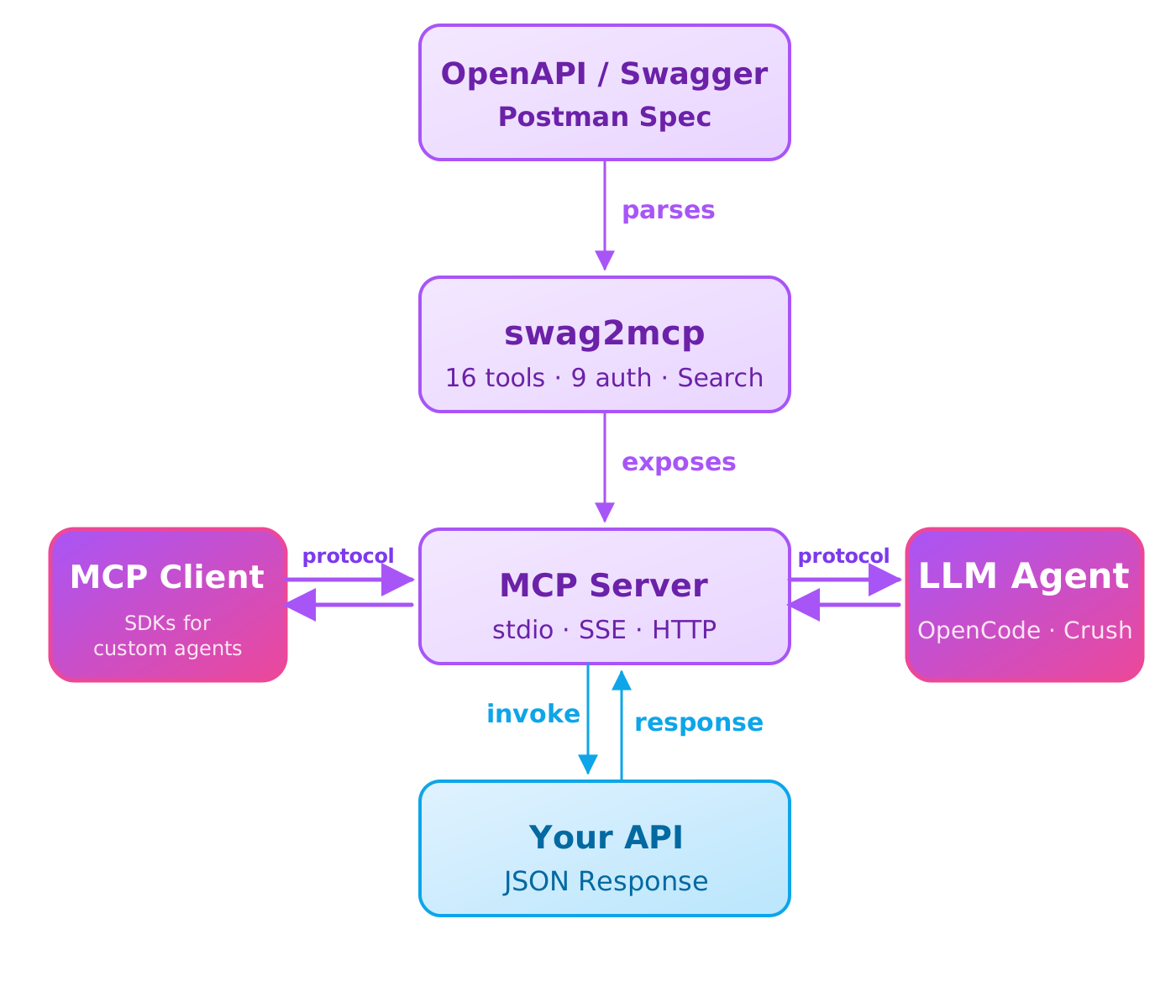
Core Concepts
Spec — a logical container representing an API domain or service (e.g., YouTube, Binance, Open-Meteo). Each spec has a unique domain, a base_url, optional auth, and contains one or more collections. You can also set llm_instruction — a short hint injected into the swag2mcp system prompt that tells the LLM what this spec is for and when to use it. Learn more: Specs.
Collection — a single OpenAPI/Swagger/Postman file describing a specific API. It points to a location (URL or local file path). One spec can have multiple collections — for example, the "meteo" spec might have "Forecast", "Air Quality", and "Marine" collections, each pointing to a different spec file. Learn more: Collections.
Tag — a category of endpoints inside a collection. Helps the LLM find the right operations more precisely. Learn more: Tags.
Endpoint — a specific HTTP method + path (e.g., GET /api/users). The LLM can find an endpoint by description, inspect its parameters and schemas, and then invoke it. Learn more: Endpoints.
Workspace — the directory where swag2mcp stores config, spec cache, saved responses, and auth scripts. Learn more: Workspace.
How It Works
Add a spec or collection — define it in the YAML config (
~/.swag2mcp/swag2mcp.yaml). For example:yamlspecs: - domain: jokes llm_title: Dad Joke API base_url: https://icanhazdadjoke.com collections: - llm_title: Jokes location: https://raw.githubusercontent.com/mmadfox/swag2mcp/main/specs/dadjoke.yamlswag2mcp parses each collection — creates Tags and Endpoints, indexes them for search.
LLM finds the right endpoint — through MCP tools (
search,endpoint_by_tag,inspect) the LLM searches for a matching endpoint by description, reviews its parameters and request schema.LLM invokes the endpoint — via the MCP tool
invoke, the LLM sends the request. swag2mcp validates every input parameter against the endpoint's OpenAPI schema (path params, query params, headers, request body) before making the call. If something doesn't match the schema, the LLM gets a clear error explaining what's wrong. Once validated, swag2mcp executes the real HTTP call and returns the result.Result goes back to the LLM — the API response is passed back to the agent. Large responses are saved to the workspace and can be explored with three dedicated MCP tools:
response_outline(see the structure),response_compress(shrink to a representative sample), andresponse_slice(extract specific fragments).
swag2mcp is a bridge between LLMs and the world of APIs. You add API specifications, and the LLM — through the MCP protocol — finds the right endpoints, inspects their documentation, and calls them. All you need to do is add a spec and start the MCP server.
Config is editable at any time. The YAML config file (
~/.swag2mcp/swag2mcp.yaml) can be edited by hand — add specs, change auth, tweak settings. After every edit, restart the MCP server (swag2mcp mcp) for changes to take effect.
Hierarchy
Spec (domain, e.g. "meteo")
  └── Collection 1 (spec file, e.g. forecast.yml)
        └── Tag 1 (category)
              └── Endpoint (GET /api/forecast)
              └── Endpoint (POST /api/forecast)
        └── Tag 2
              └── Endpoint (GET /api/forecast/{id})
  └── Collection 2 (spec file, e.g. air-quality.yml)
        └── Tag 3
              └── Endpoint (GET /api/air-quality)